This Online TI-84 calculator is the fastest way to solve algebra, calculus, and statistics problems instantly, with a free browser-based emulator. Access the full TI-84 calculator online, the crown jewel of Texas Instruments, right here, integrated with all the features you need at your fingertips.
Listen to this article
Reads the article using your browser’s voice.
What is TI-84 Calculator Online?
An online TI-84 Calculator is a browser-based calculator simulator that lets students and professionals perform math calculations without needing the physical device. It provides a convenient way to practice mathematical operations, solve supported equations, and explore calculator functions for schoolwork, homework, and everyday math-solving. Whether you're studying algebra, brushing up on math concepts, or looking for a free online alternative to a TI-84 calculator, Calc84.app helps you get to grips with math without breaking a sweat, right from your browser.
If you are looking for an online TI-84, you are in the right spot. Just click on the Start Button and solve your problems. We are providing you with the most accurate and reliable emulator calculator, not affiliated with Texas Instruments TI-84 online calculating tools. It integrates not only basic math plus linear algebra, but also advanced graphing calculator features.
Educational Fact
According to Texas Instruments, several TI-84 models, including the TI-84 Plus CE, are approved for the ACT Math test. However, an online TI-84 calculator is not a substitute for an approved physical calculator during an in-person exam. The ACT provides a built-in Desmos calculator for its online test, while the SAT offers an embedded Desmos calculator through Bluebook. Always check the official exam rules before test day. For the latest requirements, check the official ACT calculator policy or SAT calculator policy before test day.
Play videoTI 84 Calculator 01 Overview Of Online Simulator
Educational Disclaimer
Calc84.app is an independent educational platform designed to support mathematics learning, practice, and exploration. It is not affiliated with or endorsed by Texas Instruments, ACT, or the College Board. Online calculator tools are intended for educational use and may differ in features, functionality, and permitted uses from physical calculators and official testing tools. Students should verify calculations when appropriate and consult their teachers or the relevant examination authorities for current calculator requirements before taking an exam.
Why Use the TI-84 Calculator Plus CE Online?
The TI-84 Plus CE online Emulator is a useful tool for learning algebra, graphing, trigonometry, and statistics. However, not every student has access to a physical calculator at home. For homework and exam practice, students can use calc84.app to explore online tools in their browser without purchasing a physical device first.
It’s math made simple, putting the power of the TI-84 right at your fingertips. It also coordinates with the matrix, statistics, and converter emulators. In short, the TI-84 Plus CE Online Calculator is an extra online study resource that can make learning more flexible at home or on the go.
TI-84 Online Top features that help you
Polynomial Root Finder:
You solve polynomial equations (degree 2–10), quickly finding real or complex roots and showing step-by-step solutions without manual quadratic formulas.
Statistical & Scientific Functions:
1-Var & 2-Var Stats, Regression models, Probability distributions, Hypothesis tests, Matrices, Complex numbers, Trigonometry.
TI-84 Plus & Plus CE Compatibility:
Our calculator mimics the functions, menus, and key layouts of both the TI-84 Plus and TI-84 Plus CE models.
Advanced key features to look for
Dark Mode: (eye comfort, modern look)
- ✅ Responsive layout (desktop + mobile)
- ✅ Keyboard shortcuts
- ✅ Save/export graphs & tables.
- Student-Friendly: Practice and learn with confidence! Whether your classroom uses the TI-84 Plus or Plus CE, our online calculator matches both.
| Features | TI-84 Plus | TI-84 Plus CE |
|---|---|---|
| Display | Monochrome | Color |
| Design | Classic Design | Modern, sleeker design |
| Peogramming | TI-BASIC | TI-BASIC, Python |
| Math Capabilities | Standard graphing | Enhanced graphing & Math |
| User Interface | Basic Interface | User-friendly Interface |
| Support | Still Supported | Actively-maintained & updated |
How to use the Online TI-84 Calculator on our website?
Using the TI-84 online calculator here on our website is Smooth sailing. If you’re familiar with online tools, you’ll find it’s a piece of cake. If you need an offline emulator, you can download TI-84 directly from our website or visit the Play Store for the TI-84 app calculator.
Step-by-Step Instructions:
- Search for TI-84 and land on our emulator page.
- Navigate through the page with the calculator and start using our online TI-84 emulator calculator.
- Create feature values or enter your equations or data set.
How to Use the Advanced Math Menu on the TI-84 Calculator?
The advanced math menu helps you solve advanced math problems such as Cube, 3rd cube root, x-th root, and log BASE(logbase n). Here are detailed instructions for solving the math problems.
1. When you land on the calculator page, press the MATH option just under the ALPHA Test button.
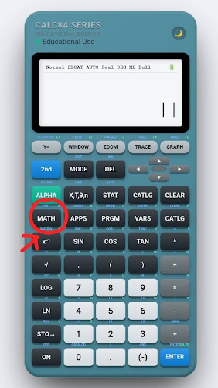
2. After pressing the button, you will see the Math Menu in three columns.
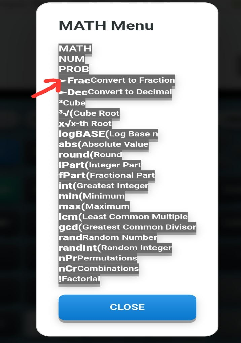
3. The first Math option integrates fractions to decimals and decimals to fractions, 3 cube, cube root, xR x-th root, and logBASE (log base n)
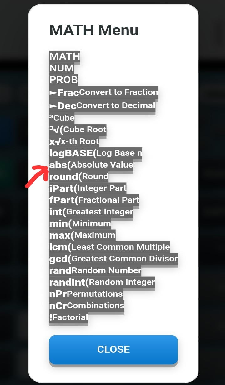
4. The 2nd NUM column incorporates the abs (absolute value), round( Round, I part( integer part), fpart( fractional part), int( greatest integer), min(minimum), max(maximum), LCM( least common multiple) gcd( greatest common divisor).
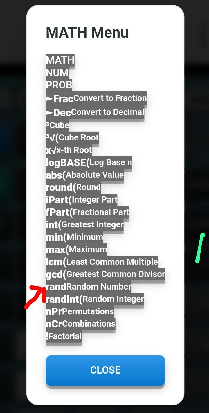
5. The 3rd PROB column unifies the following functions: rand (Random Number, randInt (Rand Integer), nPr (Permutation), nCr (Combinations), and factorial.
Purpose of this Online TI-84 Calculator
Our goal is to provide students, teachers, and professionals with a free, web-based version of the TI-84 Online calculator. It helps students practice TI-84 functions such as graphing, statistics, and scientific calculations. This prepares them for homework, classroom work, and standardized exams like the SAT, ACT, and AP tests.
Practical Uses of the TI-84 Calculator Online
- Approved for major standardized tests such as the SAT, AP, and PSAT/NMSQT, making it a dependable tool for exam preparation.
- Ideal for solving problems in Pre-Algebra, Algebra I & II with accuracy and speed.
- Helpful for advanced topics, including Trigonometry, Statistics/AP Statistics, Business & Finance, Chemistry/AP Chemistry, and Biology.
- Supports academic growth in Geometry, Precalculus, Linear Algebra, College-level Math, and general School Math.
- A powerful aid for higher-level courses such as Calculus/AP Calculus and Physics/AP Physics.
Common FAQs about the TI-84 Calculator
Is there a Free Use of the TI-84 Calculator Online?
Absolutely! Our online TI-84 Simulator Calculator is 100% free to use, whether you are a Mobile, iPad, or computer user.
Does the online TI-84 work like the real calculator?
Yes, our free virtual TI-84 online emulator includes functions like graphing, statistics, algebra, and scientific operations—just like the physical calculator.
Pros And Cons
Pros
Completely free – no purchase and a 100% free download. Accessible anywhere – works on mobile, tablet, or PC User-friendly – no need for a setup, just open and start calculating. Full core functions – graphing, algebra, calculus, statistics, and finance tools.
Cons
Requires internet – you need a stable connection to access the online TI-84. Interface differences – may look slightly different from the physical TI-84 calculator.
Conclusion
The TI-84 calculator online, the most popular Texas Instruments calculator, is the perfect solution for students, teachers, and professionals who need quick access to advanced math tools without the cost of a physical device. This is not only enough for linear algebra operations, but also ideal for solving systems of equations step-by-step. With powerful graphing, algebra, calculus, and statistics functions, this free emulator makes learning and problem-solving simple and accessible from any device.