A quick refresher on Matrix Calculator
Matrix Calculator lets you pull related matrix computations (addition, subtraction, multiplication, transpose, determinant, inverse, rank, and augmented matrix solutions like RREF and system solving) on a single page, so you don't need to run multiple tools for each operation.
What is an Online Matrix Calculator?
This online Matrix Calculator does mathematical operations and helps solve the rows & columns of a matrix perfectly and accurately. The Matrix Calculator, free from errors and bugs, performs all matrix operations and solves complex linear algebraic matrix equations quickly and precisely online. Our newly designed online matrix calculator plus algebra solver takes the guesswork out of matrix operations. It helps students solve matrix problems with ease, using a free, user-friendly tool designed for learning and practice.
What is a Matrix?
A matrix is a rectangular arrangement of numbers arranged in rows and columns. The horizontal arrangements are called rows, and the vertical arrangements are called columns. A matrix is usually represented as an m × n array, where m denotes the number of rows and n represents the number of columns.
How to use the Online Matrix Calculator?
A free online matrix calculator is the sum of matrix addition, subtraction, multiplication, division, and transpose of a matrix, where all operations are easily accessible in one place.
A matrix calculator, a complete solution for matrix operations, with steps helps you solve matrix problems clearly by showing each calculation in detail. To view every row operation and intermediate step, simply use the step-by-step feature of the matrix calculator. Follow the instructions below to get detailed solutions using the tool.
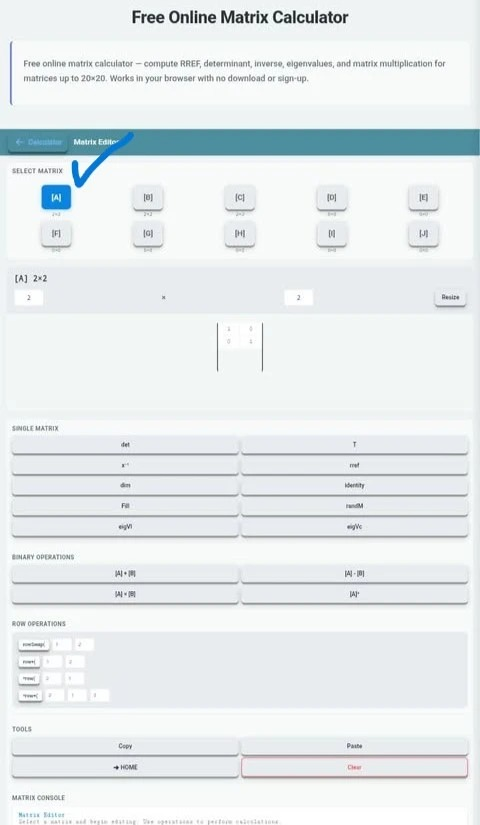
Select a matrix and set its dimensions
In the matrix editor, select a matrix such as A, B, C, or up to J that you want to perform using the Desmos matrix calculator online. Choose the number of columns and rows to resize the matrix. For example, choose 2 × 2 for a basic matrix or 3 × 3 for a larger calculation.
Enter your Matrix Values
Click each cell and enter the number, pressing Enter to commit the value. For example: enter the following number into the matrix A
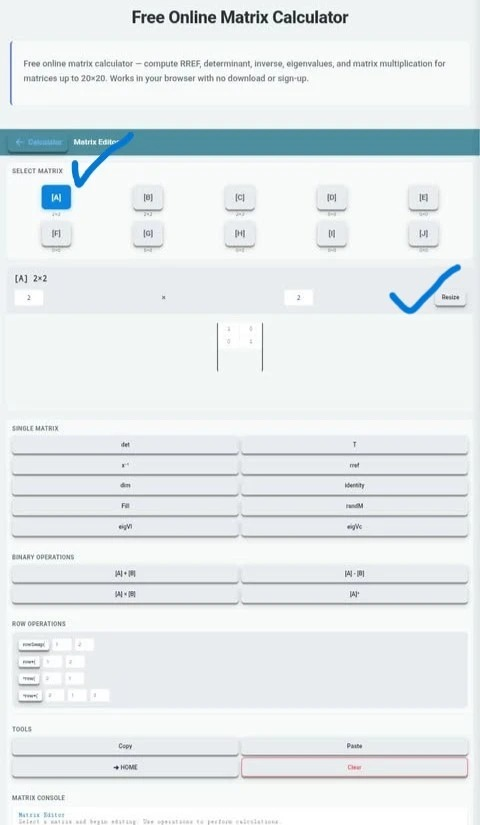
Please note that you must enter the fraction when needed. For example: type 0.5 instead of 1/2.
Choose the operation you want to perform
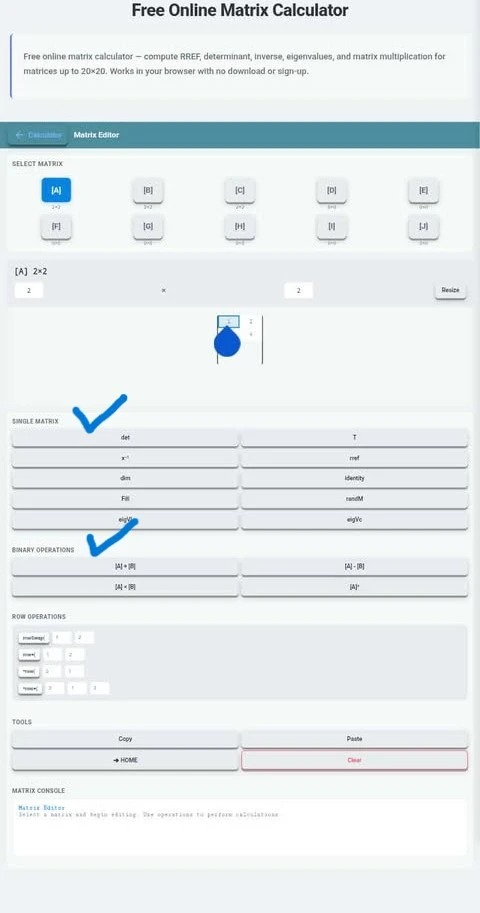
Use the single-matrix or binary-operation buttons. Select det for a determinant, x⁻¹ for an inverse, T for a transpose, or rref for reduced row echelon form. For calculations involving two matrices, select and populate both matrices before choosing addition, subtraction, or multiplication.
Check your Matrix Results
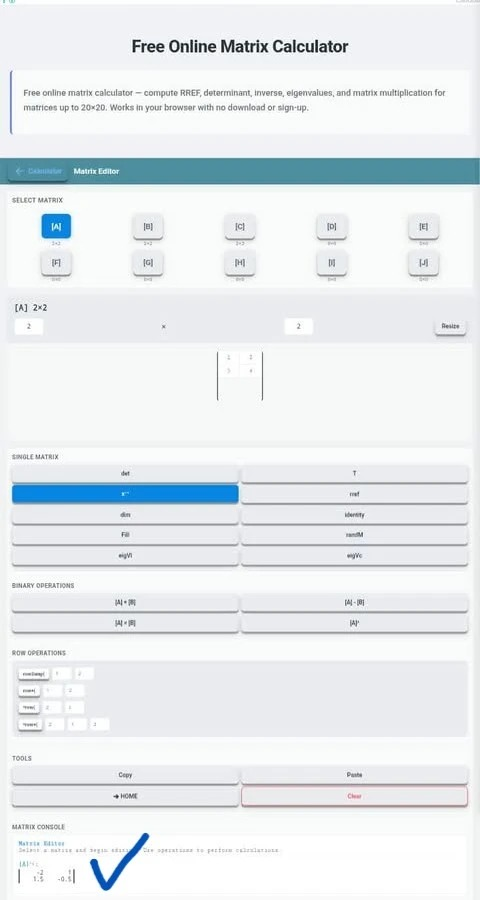
Check the matrix console beneath the editor to see the output. For RREF, read the reduced matrix to identify the solution to a system of equations.
Mathematical Features of TI-84 Matrix Calculator Online?
Matrix operations follow the strict calculation rules in the Grid. Here is a clear, step-by-step explanation of matrix operations using our advanced TI-84 matrix calculator.
Matrix Addition Calculator
Matrix addition between the two matrices can only be done when they have the same dimensions. If two matrices have dimensions like |2 + 2|, the matrix addition will be:
|A + B|
|A + B| = |1 3| + |5 7| =|6 10|
|2 4| | 6 8| = |8 12|
Matrix Subtraction Calculator
Matrix subtraction is the operation of finding the difference between two matrices of the same order by subtracting corresponding elements. The subtraction in the matrices requires the same dimensions as for the addition operation. The number of rows and columns of both matrices will be the same as in the above operation.
|A - B| [5 3] [2 1] = [3 2]
[8 6] [4 5]= [4 1]
Matrix Multiplication Calculator online
Systematic matrix multiplication is an operation in which the rows of the 1st matrix are multiplied by the columns of the 2nd to form a new matrix. The multiplication operation comes to chart when the number of columns in the first matrix matche to the number of rows of the second matrix.
A=[1 3] B=[5 7]
[2 4] [6 8]
A × B = [(1×5 + 3×6) (1×7 +3×8)]
[(2×5 + 4×6) (2×7 +4×8)]
 [6 + 18   7 +24]
[10 +24 15 +32]
[24  31]
[34  47]
Advanced Scalar Multiplication Calculator
Scalar multiplication is an operation that involves multiplying every element of a matrix by a single number, known as a scalar value. In scalar multiplication, the order of the matrix does not change, but only multiplication is performed. If K is a scalar value and A is a matrix, then the rule is as follows:
A=[aij],
Then A=[aij],
A=[2 3]
[−1 4]
and k=3, 3A= [3 ×2 3×4]
[3×(−1) 3 ×4]
[6 12]
[-3 12]
Transpose of a Matrix
The Transpose of a matrix is obtained by rearranging the rows of a matrix into columns and interchanging the columns with the rows. If you nominate a matrix to A, then the transpose of the matrix A will be:
A= [1 2 3 4]
      [5 6 7 8]
A^t = [ 1  4]
         [2  5]
         [3  6]
Inverse of a Matrix
The inverse of a matrix is a matrix that reverses the effect of matrix multiplication. For a square matrix A, its inverse is written as A−1 The product of a matrix and its inverse equals the identity matrix.
A×A−1=A−1×A=I
Where I is the identity matrix.
Common Searches about Matrix Calculator (FAQs)
How to find the determinant of a matrix?
The determinant of a matrix is found using specific formulas based on its size. For a 2×2 matrix, subtract the product of the diagonal elements. For larger matrices, methods like expansion or row reduction are used. A matrix calculator can compute the determinant instantly.
Can the matrix calculator find the inverse of a 3×3 matrix?
Yes, absolutely! This matrix calculator can find the inverse of a 3×3 matrix and 8 X 8, provided the determinant is not zero.
How do I get the reduced-row-echelon form (RREF)?
To determine the RREF, we use Gauss-Jordan elimination, which follows a series of row operations. The calculation is done by swapping the rows, multiplying the row by a non-zero digit, and adding a multiple of one row to another to make each leading entry 1 and all other entries in its column 0.
Pro Tips for Students
Calc84.app brings essential math tools together to support students at different stages of learning. Use our online matrix calculator for matrix operations and augmented matrix solving, the TI-84 calculator online for numerical calculations, and the graphing calculator online to plot functions and visualize equations. These browser-based tools make it easier to practise different mathematical concepts in one convenient place.
Conclusion
Finally, this online Matrix Calculator is not only a basic matrix operator online, but also solves linear equations by combining their coefficients and constants into one matrix. It removes the complexity of manual calculation and provides instant results precisely and accurately. Using our advanced augmented matrix calculator, you can perform all matrix operations at your fingertips.