Graphing Calculator Online is a multi-functional educational tool for math, science, and statistics. Students and teachers rely on it worldwide for plotting functions, creating scatter plots, and analyzing data. The TI-84 online calculator is a useful option for US students studying algebra, science, and statistics, as TI-84 graphing calculators are commonly used in American education. Use a free online graphing calculator emulator that works just like the original. Our virtual graphing calculator makes math a breeze, offering a simple and convenient way for students, teachers, and professionals to explore mathematical concepts anytime, anywhere.
Graph Up to Six Equations in Function, Polar, or Parametric Mode
Bring your math to life with the free calc84 online graphing calculator. You can explore up to six equations in the Y₁–Y₆ function fields and relate their graphs on the same coordinate plane. Whether you are studying Algebra, Precalculus, or Calculus, this makes it easier to plot patterns, understand mathematical relationships, and know how different equations behave.
Explore Three Graphing Modes
Function Mode (y =)
Start with familiar equations such as x^2, 2x+1, or sin(x). Plot straight lines, parabolas, and trigonometric waves, then compare their shapes. Use TRACE to inspect coordinates and the CALC tools to explore zeros, intersections, maximums, and minimums.
Polar Mode (r =)
Go beyond ordinary x-y graphs and discover curves defined by radius and angle. Try sin(5θ) to explore a five-petal rose. Polar graphing is especially useful for studying circular patterns, symmetry, and more advanced trigonometric relationships.
Parametric Mode (x(t), y(t))
Explore curves by defining their x- and y-coordinates separately using a parameter, t. For example, x(t) = cos(t) and y(t) = sin(t) describe a circle. Parametric graphing helps you understand paths, loops, and curves that cannot be represented by a single y-value for every x-value.
Why Use a Graphing Calculator Online?
A graphing calculator online, one of the most trusted online tools for US students, helps students, teachers, and professionals plot equations, visualize functions, and solve mathematical problems quickly without needing a physical calculator. With an online virtual TI-84 calculator or a TI graphing calculator emulator, you will be free to:
- Plot graphs and adjust TI-84 calculator graph settings.
- Work with scatter plots, statistics, and matrices.
- Practice graphing in the TI-84 functions program.
- Use it as an online TI-84 scientific calculator for basic math and graphs.
Play videoFree Online Graphing Calculator TI 84 Plus CE Alternative 2026
Graphing calculator online features: function, polar, and parametric graphing
Function Graphing:
X to calculate Y, making it ideal for graphing lines, parabolas, and trigonometric functions. For example: y=x^2
Polar Graphing:
Uses an angle (θ) and a distance (r) from the origin to create curves such as spirals and rose patterns. Example: r=sin(5θ)
Parametric Graphing:
Defines x and y as a function of a parameter (t), making it useful for graphing circles, loops, and paths. Example: x (t=c)os(t), y(t)=sin(t)
Compare Six Equations With Color-Coded Graphs
Make graphing easier with Calc84.app's color-coded equations. Each of the six function fields, Y₁ through Y₆, uses a different graph color, helping you identify each curve without confusion. Plot a parabola, a straight line, and a trigonometric function together to compare their shapes, intersections, and behavior at a glance. It's a simple way to visualize mathematical relationships and understand how different equations work together.
Why do students trust our TI-84 Graphing Calculator Online?
Students rely on a TI-84 graphing calculator online for tasks like:
- Graphing linear, quadratic, and polynomial equations.
- Creating scatter plots on TI-84 online for statistics.
- Solving systems of equations and matrices.
- Using the finance functions (TVM solver, interest calculations).
- Running small programs for algebra and calculus.
Why Use Our Online Graphing Calculator?
TI graphing calculator online free: No download, instant access.
Likewise, the TI-84 Calculator Online, our Virtual Graphing Calculator, is the closest match to the real TI-84 Plus and TI-84 Plus CE graphing calculator. The Texas Instruments TI-84 emulator we designed is not just a copy of the calculator’s interface, but also gives you faster performance, simple online access, and works on all devices. The TI-84 online graphing calculator emulator is also helpful for advanced graphing and solving math problems.
How to plot Fuctions on an online graphing simulator?
Calc84.app is where graphing equations becomes a breeze, helping students visualize functions, graph equations, solve problems, and explore mathematical concepts online without downloading any software. On a TI-84-style graphing calculator, Y₁, Y₂, Y₃, Y₄, Y₅, and Y₆ are function-entry fields where you can enter up to six equations and display their graphs on the same coordinate plane. The graph will show the result as below.
1. Y₁ — First function
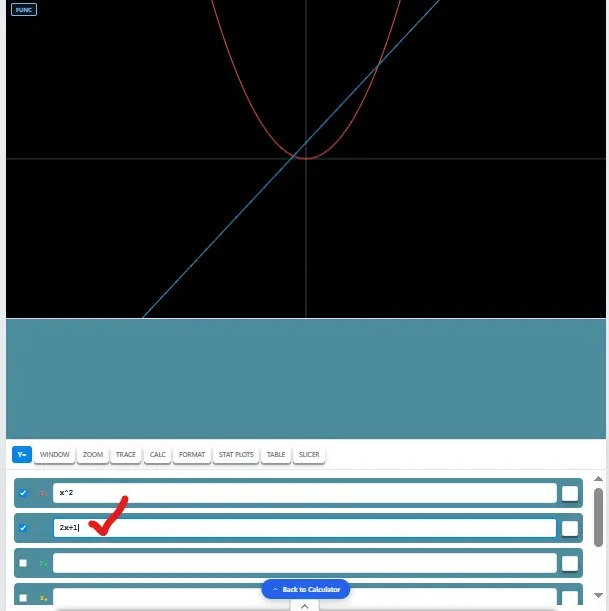
After landing on the graphing page, enter x^2 in the Y1 function field. The graph shows you
2. Y₂ — Second function
After performing the first equation, enter 2x+1 in the Y2 function field. Here, the graph will show you the results: a straight line with the parabola
3. Y₃ — Third function
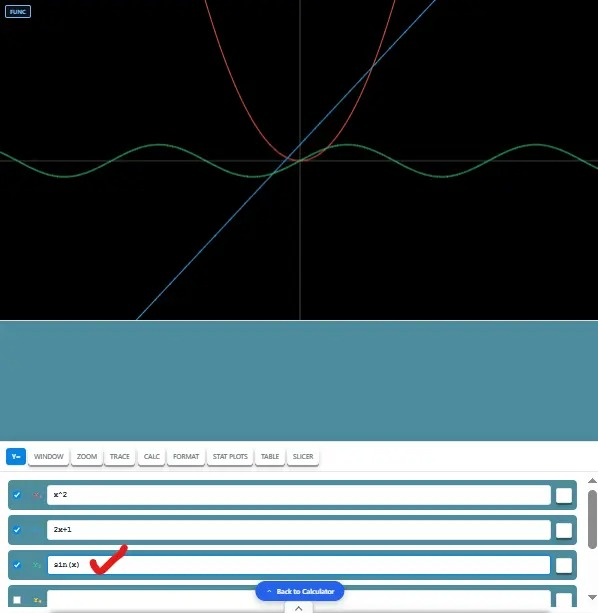
Enter sin(x) and explore the smooth, repeating pattern of the sine wave. See how trigonometric functions behave alongside your other graph.
4. Y₄ — Discover Cubic Curves
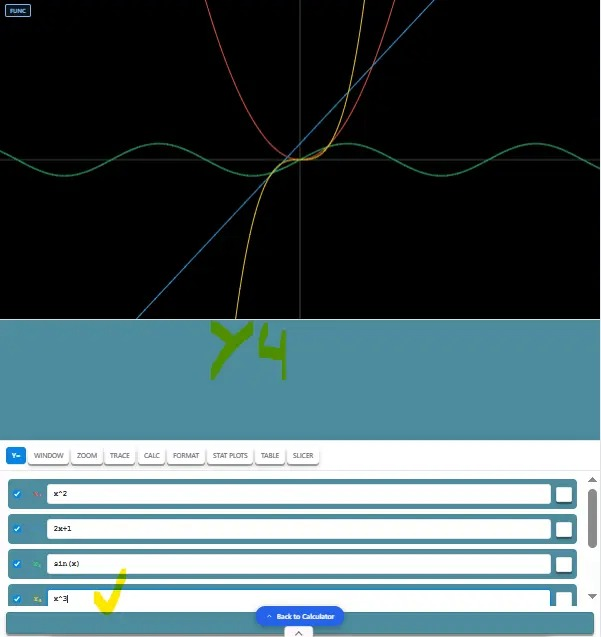
Type x^3 to uncover the cubic graph with its distinctive S-shaped curve. Compare it with your parabola and straight line to see the differences at once.
Y₅ — Explore the Cosine Wave
Add cos(x) to visualize the cosine wave and compare its functions with the sine function. It is a simple way to explore how these two trigonometric functions relate.
Y₆ — Reveal Reciprocal Functions
Try 1/x to inspect a reciprocal graph with two separate branches. Compare its unique shape with other graphs and discover how the function behaves near the axis.
Commonly Searched FAQs about TI-84 Graphing Online Calculator
How do you find the intersection of two graphs?
When you enter two equations in separate function (Y1–Y6) fields, such as x^2 and 2x+1. You can observe the calculator's graph analysis tools, where available, to locate their intersection. The intersection coordinates represent values that satisfy both equations.
Can I find zeros, derivatives, and integrals with an online graphing calculator?
Calc84.app's available CALC tools can help you investigate features such as zeros, numerical derivatives, and definite integrals. The results depend on the selected mode, equation, and supported calculator functions.
Can I choose an online graphing calculator for exam practice?
Yes, you can choose this free graphing calculator. Some of the exam boards allow TI-84 Plus CE online graphing calculators for practice, but in official exams, you’ll need the approved physical device. You can log in to your Androids, iPhones, Tablets, and iPads for free. Therefore, if you need a TI-84 for your exam, try one physically.
Conclusion
Calc84.app makes online graphing simple and accessible for students, teachers, and anyone exploring mathematics. From plotting functions in Y₁–Y₆ to comparing six color-coded graphs, you can visualize equations, explore different graphing modes, and better understand mathematical relationships directly in your browser. Whether you're studying Algebra, Precalculus, or Calculus, our free online graphing calculator offers a convenient way to practise without downloading software. Try Graphing calculator online today and bring your equations to life, one graph at a time.